
Customer Portal · Home improvement
Three quotes.
Two of them vanished.
You did the visit, wrote the quote, sent it. Then it went quiet. Give every homeowner a page under your logo with their estimate, invoice, files and appointments.
For home improvement businesses. Enquiry only, no account access needed.
5.0 on Google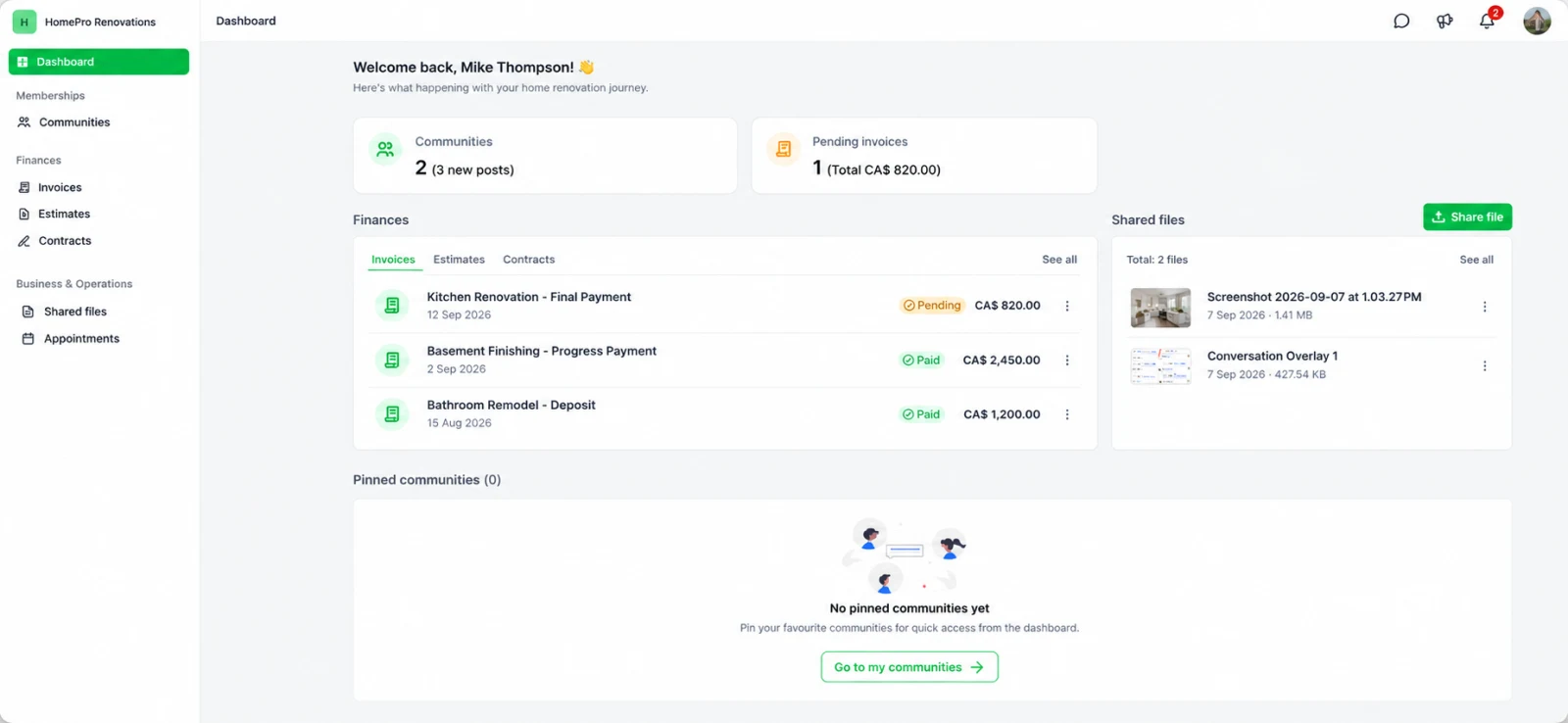
Example names, amounts and project details.
Enlarge previewYour name on it, not oursRuns at your address, for example portal.yourcompany.ca
Nothing new for your crewYour office keeps the tools it uses today
Installed and tested by us30 days of monitoring after it goes live
What the homeowner opens
Everything you already sent.
Somewhere they can’t lose it.
Right now, the estimate you paid to produce is competing with two other contractors’ attachments in the same inbox.
- 01
The estimate you paid to produce
The quote you already emailed, kept at an address that is yours. The cost of the visit and the write-up stops disappearing into a mail thread.
- 02
The contract and the invoice
Signed paperwork and what is owed, in one place. They pay from the same login, so your office stops resending paperwork and explaining where to pay.
- 03
Files from their job
Measurements, progress, finished work. You upload the files and the homeowner opens them from their own file area, which answers the “is anything happening” call before it is made.
- 04
Their appointments
The measure, the install, the service call. They book, reschedule or cancel on the calendars you choose to open, so a date can move at 9 pm without a voicemail your office returns tomorrow.
Your tools
Your team keeps its tools.
The homeowner sees the portal.
Keep the tools you have. Upload what they produce, or send estimates and invoices from the account. It all lands in the homeowner’s login.






 Google Business Profile
 Facebook & Instagram
 Google Ads
 Stripe
 Zapier
QuickBooks, Jobber, Housecall Pro, Calendly, Google Business Profile, Facebook and Instagram, Google Ads, Stripe, and Zapier connect directly. Cal.com and HubSpot connect through a connector app; Buildertrend by export and upload. Documents created in the account are what the homeowner sees.
Google reviews
In our clients’ words.
★★★★★“The system is easy to use, and the results speak for themselves.”
★★★★★“Their software not only attracts potential customers but also helps us engage with them more effectively.”
★★★★★“I really have a peace of mind knowing that my marketing is in good hands with people I can trust and rely on.”
Reviews of working with Social Traffic, not measured results from this installation.
Installation & access
The complete setup.
Messages, workflows, and a branded account. Built and tested for your business.
Included in your installation
50+ assets in your follow-up library
A combined library of branded email and SMS templates, nurturing workflows, and forms. We configure the agreed campaigns for your business. SMS is activated only with approved sending setup and permissions.
Follow-up + long-term nurturing
New enquiries, appointment reminders, quote follow-up, and longer-term messages for prospects who are not ready yet. Includes one eligible reactivation campaign and post-job review and referral requests. Timing and stop rules are set with you.
Custom forms + AI trained on your business
Forms that capture the details your team needs. AI configured with your services, service areas, approved answers, and qualification questions for supported chat channels. Pricing decisions and unusual requests go to your team.
Your full Social Traffic account
Conversations, pipelines, calendars, customer history, team alerts, and reporting. All in your branded account.
Customer portal for your homeowners
Not for your team. Each homeowner you quote gets their own login on your subdomain, under your logo, holding their estimate, contract, invoice, job files, and appointments. Social Traffic is named nowhere on it.
Testing + 30 days of monitoring
Recorded workflow tests, a staff guide, and monitoring during the first 30 days. We check the agreed sources, replies, and handoff rules before sign-off.
Installed and tested with your team. If an agreed workflow fails its test, we fix it before sign-off.
Ad management, cold outreach, voice answering, estimating, price negotiation, and closing are not included. Appointments, sales, and revenue are not guaranteed.
Before you decide
A few things
worth knowing.
Best fit: home improvement businesses that quote in the home and run jobs over several weeks.
Is this another app my crew has to learn?
No. The portal is what the homeowner sees. Your office keeps working the way it does now, and what you already send, such as estimates, invoices, appointments, and files, is what shows up in their login.
Do we need a new domain name?
No. It runs on a subdomain of the one you own, for example portal.yourcompany.ca. We set that up with whoever manages your DNS during installation.
Can homeowners actually book and change appointments?
Yes. You decide which calendars are available to them. On those calendars they can book, reschedule, or cancel, and the change lands on your calendar. Calendars you do not open stay private.
How do the photos get in there?
You upload them to the homeowner’s record and they appear in that homeowner’s files, where they can view and download them. It is a file area rather than a designed photo gallery.
Does this replace our estimating or accounting software?
No. Your estimating, scheduling, and accounting tools stay in place. We connect what the homeowner needs to see and leave the rest alone.
What if a homeowner never logs in?
Nothing breaks. They still receive the emails and messages you send today. The portal is somewhere for those things to live, not a replacement for sending them.
Can they follow where their job is up to?
Not as a progress tracker. There is no job-status timeline. They see their documents, their files and their appointments, and what you put there is what they see.
Is this another subscription I can’t get out of?
Installation is one payment, due after we agree the scope. The first 30 days of account access are included. Continuing access is optional and monthly, plus communication and AI usage. Being straight about it: the portal is hosted, so if you stop paying for access it stops running. There is no term you have to buy your way out of.
Will this win us more jobs?
We do not guarantee sales. What we commit to is the installation: the portal on your domain, your branding, the documents, payments, files, and calendars connected and tested. Pricing, sales conversations, and closing stay with your team.
Portal plan
Stop competing on who sent
the tidiest PDF.
Tell us what you send a homeowner today. We reply within one business day with what your portal would hold and what installing it involves.
No call booking, customer upload, or account access required.
Prefer to call? (855) 576-0406