


Jump to a section
To create useful AI UGC videos for a small business, start with a question a customer asks before buying. Show something real that answers it. Use AI to help turn that material into a short video, then give the viewer one clear way to enquire.
You do not need a fictional customer saying your company changed their life. You need a believable explanation of what you do and why someone should take the next step.
This guide builds three video concepts for a window business. Adapt the same approach to a renovation company, cleaning service, showroom or other business with work it can demonstrate. The downloadable production sheet includes filled examples and space for your own.
Choose who should be on camera
UGC means user-generated content. A real customer's account of their experience is different from a paid creator explaining an offer, an employee demonstrating a product, or an AI presenter reading a script. They can share a casual visual style without being the same thing.
| Your situation | Start with | What not to imply |
|---|---|---|
| You can explain your work on camera | Owner or employee, filmed on a phone | That an employee is an independent customer |
| You have useful footage but do not want to speak | Real footage with narration and captions | That generated footage proves your workmanship |
| You need a presenter without filming one | A clearly identified AI spokesperson | That the avatar bought or used your service |
| A customer wants to share their experience | Their actual words and footage, with permission | Results or experiences they did not report |
For local service businesses, our starting recommendation is real work plus a real explanation. AI is useful for planning and production; it cannot supply evidence of your service quality.
The FTC's guidance explains that an avatar can raise testimonial issues depending on what the ad communicates. An AI label does not make a made-up customer experience truthful. Keep your script in the business's voice: “Here is what we check,” not “They replaced my windows and saved me $500.”
Film once. Answer three different buying questions.
Start with a topic your team can explain accurately. Our example is what to check before requesting a window replacement quote. Have the business confirm every technical statement and every description of its process before filming.
Collect five short clips:
- A: owner or team member beside a window sample.
- B: close-up of the actual sample, handle or frame detail being discussed.
- C: team member demonstrating an inspection or measurement they genuinely perform.
- D: a completed job you have permission to show, without revealing the customer's address.
- E: a simple closing shot with the business name and next step added during editing.
Record vertically. Leave room around the subject for captions and platform controls. TikTok recommends 9:16 framing, at least 720p footage and keeping important content inside the interface safe zone. Its guidance also favours a clear early proposition, an informal style and a specific CTA. Treat those as a starting point, not a conversion guarantee. TikTok creative guidance
Video 1: Answer the question before asking for the sale
Purpose: help someone who does not know whether to enquire. Use clips A, B and C.
Not sure what to include when asking about your windows? Start with what you are noticing: how they open, where the problem is, and how many windows are affected. That gives our team a better starting point than a price question on its own. Tell us about the project through our enquiry form, and we will explain the next step.
Only use this CTA if the team really reviews those details. It promises a next step, not a diagnosis from a video or a guaranteed replacement price.
Video 2: Show the process people cannot see yet
Purpose: make contacting you feel less uncertain. Use clips A, C and E.
Wondering what happens after you ask for a quote? Here is our process: approved first step, then approved second step. Before any work starts, we explain what your business actually confirms. Start with the enquiry form and tell us what you want to change. We will let you know what information we need next.
Replace the brackets with your actual process. Do not let the video generator fill them with free inspections, response times or guarantees you have not approved.
Video 3: Address an objection without inventing a discount
Purpose: help someone who is comparing options. Use clips B, C and E.
Comparing window quotes? Before comparing the total, check what each one includes: the product, installation work, finishing, disposal, and any stated exclusions. If something in our quote is unclear, ask us before deciding. Use our enquiry form and tell us which part you want explained.
These are three different reasons to enquire, not three ways of saying “contact us.” Start with the question your team hears most often. Do not claim one script is a winner before it has run.
Which AI UGC platform should you try first?
For ad-style AI actors, put Arcads on the shortlist. For product-page-to-ad production, compare Creatify. For a consistent business presenter and editable explainers, compare HeyGen. That is a fit recommendation from documented capabilities, not a claim that one produces the highest-quality video in every case.
| What you need | Platform to evaluate | Why it belongs on the shortlist |
|---|---|---|
| A casual AI presenter for short social ads | Arcads | Its current product advertises an AI actor library, UGC Studio and actor/voice tools. It is not a promise of a human customer recording. |
| Several ad concepts built around a physical product | Creatify | Documents URL-to-video, ad formats and batch variations. Check every extracted claim and product visual. |
| A repeatable presenter-led explainer | HeyGen | Documents your own assets, plan approval and scene editing. It also offers custom avatars, which require appropriate consent. |
Creatify's current Starter pricing lists $39 monthly and 100 credits. HeyGen's Creator monthly pricing lists $29 and 600 credits. Credits are not interchangeable between vendors. Arcads pricing was not established from the public page checked, so check its current quote before paying rather than relying on third-party price tables.
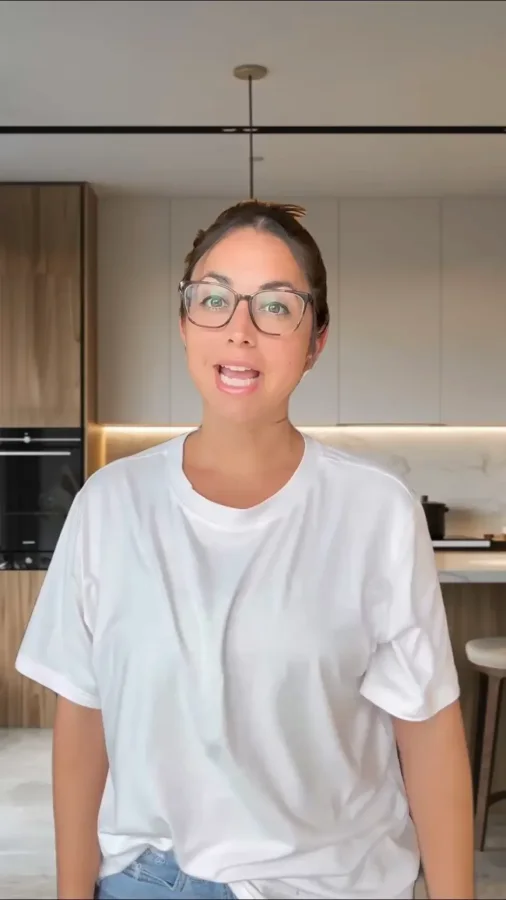
Arcads: presenter-led social ads
This example from Arcads shows the casual, direct-to-camera style to look for when evaluating an AI presenter. Check movement and speech in the actual video before choosing an actor; a still cannot demonstrate either.
Creatify: product-focused creative
Creatify's example puts the product at the centre of the frame. Use your own product references and reject a result that changes the packaging, shape or features you sell.

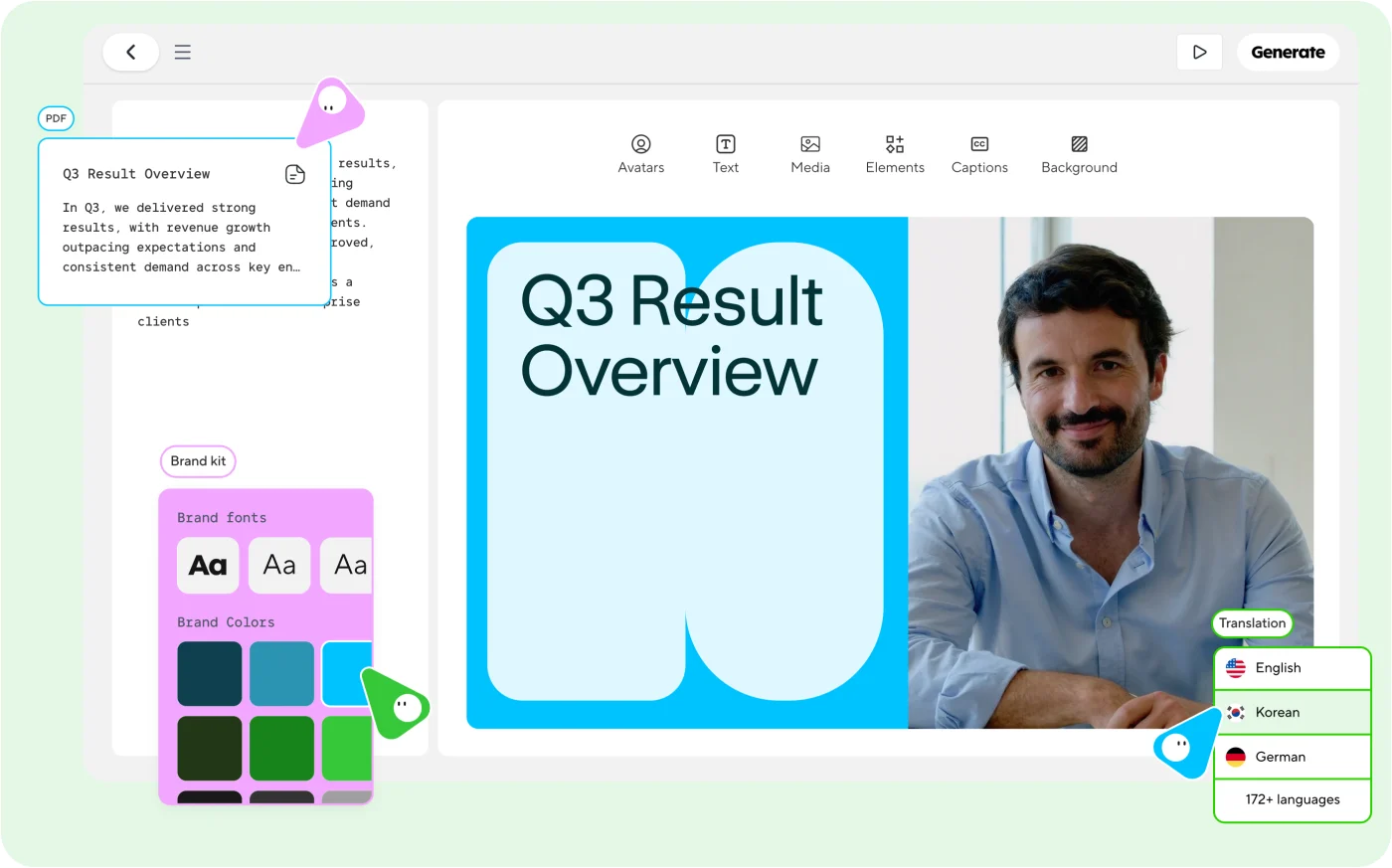
HeyGen: script and scene editing
HeyGen's AI Studio product image shows the script beside the presenter, with editing and brand controls. This is the vendor's interface illustration, not a screenshot of a video we produced.
Test quality with your own script
Use the same approved script and source clips in two shortlisted tools. Compare the exported files on a phone, not just the vendor demo. The best fit is the one that passes your requirements at a workable cost.
| Check | Reject or revise when |
|---|---|
| Speech | Your business name is wrong, pauses feel unnatural, or speech is rushed |
| Face and hands | Mouth movement, teeth, fingers or gestures distract from the message |
| Product accuracy | The model changes the frame, handle, label or feature being explained |
| Editing | You cannot replace a bad shot or correct a caption without excessive rework |
| Commercial use | You cannot establish rights for the presenter, music and intended use |
| Usable cost | Rejected renders and corrections make each approved video too expensive |
Calculate production spend divided by approved videos, not generated videos. If an illustrative $30 test produces six drafts but only two usable videos, that is $15 per usable video before your time. This is an example calculation, not a quoted vendor rate.
Build the video with AI, but review the plan first
One documented option is HeyGen Video Agent. Its written Academy guide describes adding your own media, reviewing a proposed video plan, then editing the resulting scenes. These instructions are based on that documentation, not an observed render in our account.
- Open Video Agent from the HeyGen dashboard.
- Add your approved script and describe the audience, purpose and style.
- Add your own media and choose the layout, presenter and length available in your account. For this example, aim for a short vertical video rather than a long introduction.
- Review the proposed plan before confirming generation. Check which footage appears against each claim.
- Open Edit on the result. Replace inaccurate visuals, correct captions and remove any invented claims. The Academy guide also documents deeper editing through AI Studio.
Create a short vertical business explainer using the approved script and uploaded clips below. Aim for about 25 seconds, but keep the speech natural rather than rushing to fit. Use the real footage to demonstrate our work. Do not generate customer homes, completed installations, before-and-after results or customer testimonials. Do not change product details or add prices, savings, warranties or response-time promises. Show the plan for approval first. Mark any missing footage instead of inventing it. Use readable captions and one closing enquiry CTA. If you use an AI presenter, identify it clearly as an AI spokesperson. Do not present that person as a customer.
Approved script: paste the reviewed script Available clips: list each filename and what it actually shows Business name: name Closing action: the existing enquiry form or approved contact route
Instructions are not a guarantee that generated output will obey them. Watch the complete result. If the window, hands, product geometry or work shown is wrong, replace that scene with your original footage rather than trying to explain the error in a caption.
What it costs to try
HeyGen's pricing page, checked September 8, lists a free plan with three videos a month up to one minute. Creator monthly is listed at $29 with 600 credits, 1080p export and watermark removal. Check the selected feature's usage and your checkout currency before paying. A general plan allowance does not establish the cost of every Video Agent render or revision.
You can also record yourself and edit footage in an editor you already use. AI presentation is optional. Budget for rejected takes, edits and your review time, not just the first generated file. Ad spend, paid creators and music rights are separate costs.
What a real discussion changes about the plan
In a Reddit discussion about AI UGC campaigns, one reader asked:
That is the useful question here. Changing the presenter or opening word does not necessarily change the reason someone would enquire. Our three scripts test different concerns: what to ask, what happens next, and how to compare.
The thread also contains vendor recommendations and claims of campaign improvements without supporting data. We are not using those claims as benchmarks or treating the commenters as verified experts.
Give interested viewers somewhere useful to go
The video and the destination should make the same promise. A video about understanding a quote should not land on a page that only offers a generic newsletter.
Use your existing enquiry form, not a new form for each clip. If your website supports campaign tracking, use a distinct link for each video. For example, an illustrative tagged destination might be:
https://your-business.example/contact?utm_source=instagram&utm_medium=organic_social&utm_campaign=window_questions&utm_content=quote_comparison
Replace that address with your real destination. Tags alone do not make your form save the source: confirm that your website and CRM capture them. On platforms where caption links are not clickable, use the supported profile or ad destination and explain that next step accurately.
Before posting, send one clearly marked internal test through the form. Confirm the correct page loads, the request reaches the right inbox, the source is recorded if configured, and a person owns the next step. Do not test with a real customer's information.
This is where an installed lead-response system becomes relevant: approved answers, follow-up and staff handoff after someone enquires. Making the video does not install that system automatically. If the request does not arrive, fix the contact path before sending viewers there.
Check these details before you post
- Truth: every spoken claim matches the business's actual service. No fictional customer experience or generated proof of workmanship.
- Permission: obtain permission for people, customer footage and locations. Confirm whether it covers organic posts, paid ads, platforms and duration. Consent to appear in a recording is not blanket consent to clone a face or voice.
- Music: use audio cleared for the intended business use. Do not assume a sound available in a personal account is cleared for advertising.
- Readability: watch on a phone with sound off, then with sound on. Check captions, pronunciation and whether controls obscure the CTA.
- Destination: the link works, the form accepts a test and your team receives it.
Use the production sheet to record the angle, footage, approvals, destination and what happened after posting.
Judge the video by the enquiries, not just the views
Track views and clicks if the platform provides them, but also record enquiries and which ones your team could genuinely help. Keep paid and organic results separate. A cheaper click is not a better result if it brings the wrong projects.
Start with one complete video. If people click but do not enquire, inspect the page and form before regenerating the presenter. If enquiries arrive but go unanswered, improve the response after the lead arrives. More video versions will not fix a broken next step.
Sources and limits
Tool instructions and pricing checked September 8, 2026 against written vendor documentation. Scripts and the production worksheet are original examples. No paid video render or live lead-routing test has been completed for this guide.
Updated September 8, 2026. Examples are not client results.
Sources and research notes (4)
- Create videos with Video AgentHeyGen Academy
Written instructions checked September 8, 2026. Covers assets, plan review and editing. The linked video was not used as evidence.
- HeyGen pricingHeyGen
September 8, 2026: Free lists three videos monthly, up to one minute; Creator monthly lists $29 and 600 credits. Feature usage and checkout terms must be checked separately.
- Creative best practices for performance adsTikTok for Business
June 2025 guidance checked September 8, 2026: vertical framing, safe zones, early proposition, hook and CTA. General guidance, not a promised result.
- Consumer reviews and testimonials rule: questions and answersUS Federal Trade Commission
Guidance distinguishes advertising from purported customer experiences. Not a complete legal review or a Canadian compliance assessment.
Vendor claims, independent reporting and our recommendations have different evidence limits. Linked material is attributed to its publisher; no endorsement is implied.